JRS Tracking Number: How to Track JRS Express Parcels Online
Whether you are waiting for a critical legal pleading, dispatching e-commerce goods, or sending a care package (padala) across the Philippine archipelago, package visibility is essential. JRS Express (operated by JRS Business Corporation) has delivered mail, parcel express, and cargo across the country for over sixty years.
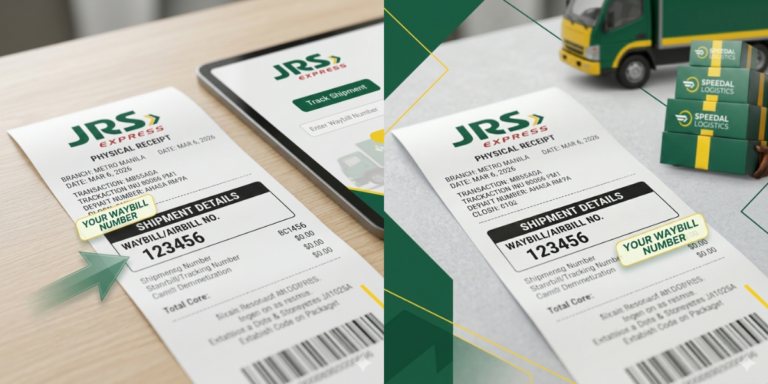
Tracking a JRS Express package is simple, but it differs slightly from couriers that issue a single, universal tracking string. In the official JRS system, tracking typically requires two separate identifiers: the Airbill / Official Receipt (OR) Number and the Branch Code (BC).
Anatomy of a JRS Tracking Number & Receipt
When you drop off an item at a JRS branch or complete a booking, the counter associate issues an official paper receipt (or a digital waybill confirmation for online merchant bookings).
JRS EXPRESS OFFICIAL RECEIPT
The Key Identifiers Explained
How to Track Your JRS Shipment Step-by-Step
There are three primary methods to track your JRS Express parcel: through the official website, via QR code scanning, or using multi-carrier tracking platforms.
Method 1: The Official JRS Express Website
The official web tracker provides the most up-to-date log directly from internal logistics databases.
Method 2: Instant Tracking via QR Code
If you have the physical receipt or a high-resolution photo of it, you do not need to type numbers manually.
Method 3: Multi-Carrier Aggregators
If you are tracking international forwardings or parcels consolidated through multi-courier platforms (such as Ship24 or ParcelMonitor), you can enter the full alphanumeric string (e.g., BC-Airbill format such as 161-481187 or the 10–12 digit master waybill) directly into their search bars.
Comparing JRS Express Tracking Methods
Tracking Channel | Required Data | Speed | Best For |
|---|---|---|---|
Official Website Portal | BC Number + 6-digit Airbill | Instant | Standard desktop & mobile browsing |
Smartphone QR Scan | Physical receipt / Screenshot | Fastest (One Tap) | Senders & receivers with receipt photos |
Branch / Phone Hotline | Airbill OR or Sender/Receiver Name | 3–5 Minutes | Complex inquiries, claims, and address changes |
Third-Party Aggregator | Master AWB or Combined Code | Instant | Cross-border and multi-carrier shipments |
Common JRS Tracking Errors and Solutions
“Tracking Number Not Found” or Blank Response
Why it happens: When a package is dropped off at a retail branch, the physical paper receipt is issued immediately, but the batch record might not upload to the central database until the evening dispatch sweep.
How to fix: Wait 2 to 4 hours after drop-off before checking the portal. If tracking an online purchase, verify that the seller has physically handed the parcel over to JRS rather than merely reserving a waybill number.
Confusing the Branch Code with the Airbill Number
Why it happens: Entering all digits into a single field causes the website’s query engine to fail.
How to fix: Ensure the 3-digit Branch Code is placed exclusively in the BC box and the 6-digit Airbill Number is entered in the Airbill box.
Delays Due to Weather and Island Logistics
Why it happens: The Philippines experiences frequent weather disruptions, particularly during the typhoon season (June to November). Philippine Coast Guard sea voyage suspensions or domestic flight groundings directly affect cargo movement between Luzon, Visayas, and Mindanao.
How to fix: If your tracking status remains on In Transit for more than 48 hours without a sorting scan, check local travel alerts along the transit corridor.
Proactive Tips for Smooth JRS Deliveries
To minimize delivery issues, apply these best practices whenever shipping or receiving via JRS Express:
FAQs
Conclusion
Tracking your shipment through JRS Express is fast and accurate once you know how to combine your 3-digit Branch Code with your 6-digit Airbill Number. By understanding delivery checkpoints and keeping digital copies of your receipts, you can monitor your packages with complete confidence from dispatch to destination.